
E - Commerce | AI/ML services
eCommerce Transformation with AI & Modern UX
How artificial intelligence and modern UX design are rewriting how shoppers discover, decide, and buy, and what ecommerce brands need to do now to keep pace.
Read More


AI workflow automation has moved from experimental pilot to operational default. The businesses pulling ahead in 2026 aren't the ones with the flashiest AI demo; they're the ones that quietly rebuilt their approval chains, data entry, and customer workflows around it.
KEY STATISTICS
|
88% Of organizations use AI automation in at least one business function |
$4.4T Potential annual economic value from generative AI and automation combined |
35% Average reduction in operational costs after adoption |
94% Of workers report doing repetitive tasks that could be automated |
AI workflow automation combines traditional rules-based automation with AI models that can read documents, make judgment calls, and adapt to changing conditions instead of just following a fixed script. Where older automation could move a file from folder A to folder B, AI-driven automation can read what's in the file, decide what should happen next, and take that action itself.
This shift is often described as intelligent automation, the convergence of rules-based automation with AI that can handle unstructured data and adapt as conditions change, expanding the range of tasks worth automating. The result: tasks that once needed a human's judgment- reviewing an invoice, routing a support ticket, drafting a first-pass contract- can now run largely unattended, with people stepping in only at exceptions.
“Automation used to mean fewer clicks. Now it means fewer decisions a human has to make at all; the workflow decides, and the person reviews." Cinovic AI Advisory Team
Before picking tools, businesses need to get these four fundamentals right.
|
Process Visibility Map the actual workflow as it happens today, not as it's documented. Most automation failures start with automating a broken process. |
AI Decisioning Layer The models and logic that read data, apply judgment, and route exceptions, document extraction, classification, summarisation, prediction. |
|
Your CRM, ERP, helpdesk, and finance tools need to talk to each other. Automation dies at the handoff between disconnected systems. |
Human-in-the-Loop Controls Clear checkpoints where a person reviews, approves, or overrides especially for anything customer-facing or financial. |
Not every process deserves automation on day one. These categories consistently deliver the fastest payback.
1. Document & Data Processing
Extracting, classifying, and validating data from invoices, contracts, forms, and applications is one of the most mature use cases. It removes manual re-keying, the single biggest source of workflow errors.
2. Customer Support & Front-Desk Automation
AI now handles roughly 30% of customer interactions, a share projected to reach 50% by 2027, largely because AI-driven conversations cost a fraction of what a human-staffed interaction costs. For service businesses, this is quickly becoming table stakes rather than a differentiator.
3. Approval & Routing Workflows
Multi-step approvals, purchase orders, expense reports, HR requests, are ideal candidates because the decision logic is usually well-defined, and AI can flag genuine exceptions instead of forcing every request through a human queue.
The newer wave of automation goes beyond chatbots and simple triggers: agentic AI systems autonomously execute multi-step workflows, handle complex decision-making, and adapt as business conditions change, rather than waiting for a human to chain each step together manually.
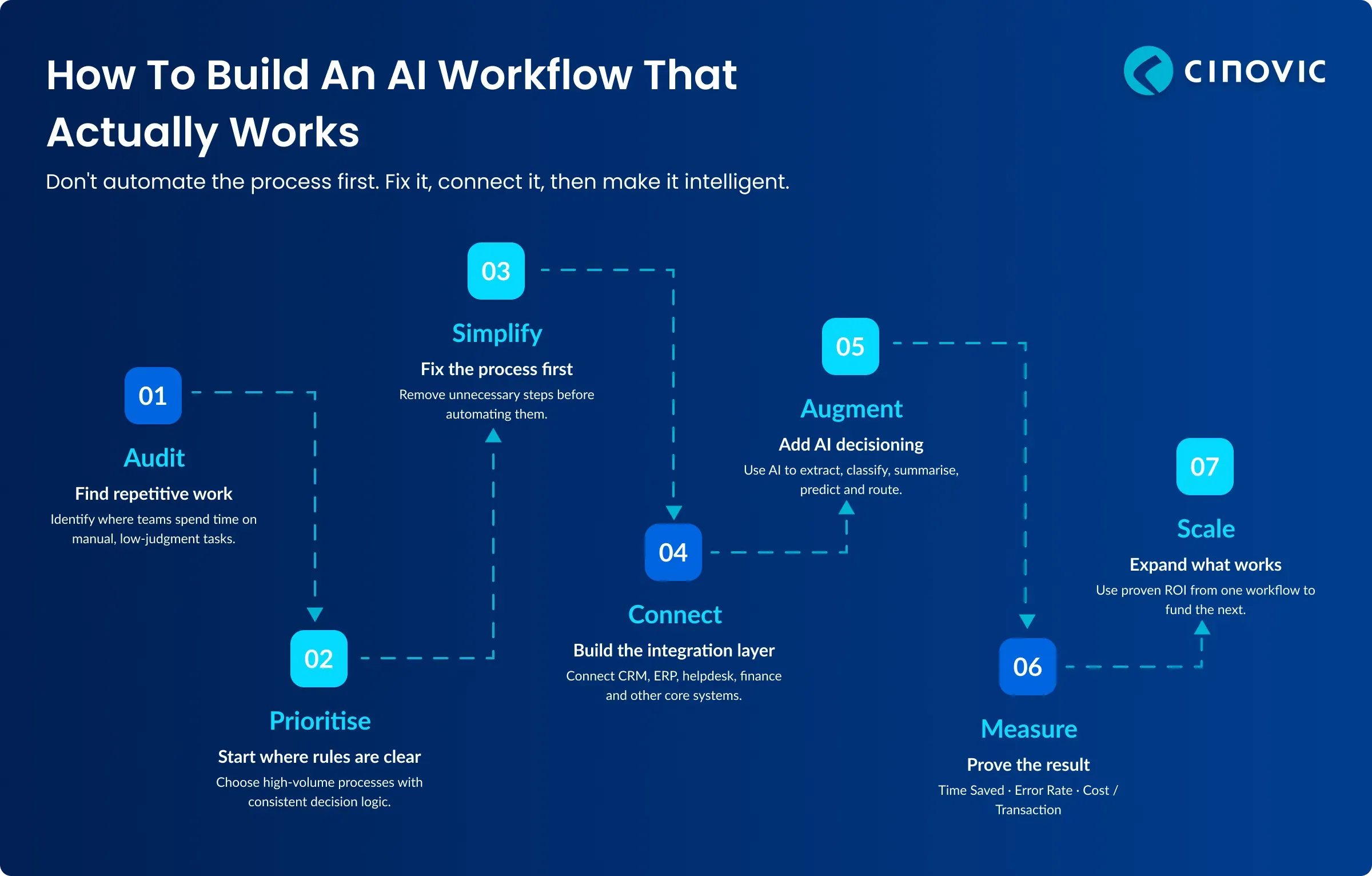
Theory without execution is just wishful thinking. Here is a battle-tested roadmap to move from idea to results.
Audit Repetitive Work: Survey teams to find where people spend hours on manual, low-judgment tasks. This is almost always broader than leadership expects.
Prioritise by Volume and Rules-Clarity: Start with high-volume processes that follow relatively consistent logic. Ambiguous, judgment-heavy processes come later, once trust in the system is established.
Fix the Process Before Automating It: Automating a broken workflow just makes the mistake happen faster. Simplify first.
Build the Integration Layer: Connect your core systems so data flows automatically between them, rather than being re-entered at each handoff
Deploy with Human Checkpoints: Launch with a review step on every automated decision. Loosen the checkpoints only as accuracy is proven over time.
Measure and Expand: Track time saved, error rate, and cost per transaction. Use the win to fund the next workflow.
Theory is easier to trust next to a real build. Cinovic's Restaurant & Hospitality Operations Platform shows what happens when scattered, manual workflows are consolidated into one automated system.
The problem: purchasing, stock, cash management, and finance were handled across disconnected tools and manual processes. That works for a single site, but every new location added more manual effort instead of more leverage.
The approach: rather than adding another point tool, Cinovic built one digital platform with a shared data foundation and streamlined, automated workflows across the core operational areas the "fix the process, then connect the systems" sequence this guide recommends.
The results:
The lesson for any team starting with automation: the biggest gains come from fixing and connecting the process first, and layering intelligence on top of a clean workflow second.
Common AI Automation Mistakes to Avoid
Automating the exception, not the rule: Trying to automate the messiest 10% of a process first, instead of the consistent 90%, burns budget and trust.
No human checkpoint: Removing people entirely from customer-facing or financial decisions too early leads to costly, hard-to-catch errors.
Tool-first thinking: Buying an AI automation platform before mapping the actual process it needs to run.
Ignoring data quality: AI decisioning built on inconsistent or siloed data produces unreliable outputs, no matter how good the model is.
Treating it as a one-time project: Workflows change as the business does. Automation needs an owner, not just a launch date.
At Cinovic, we design AI-driven workflows that fit how your teams actually work, not generic automation templates. Our approach combines hands-on delivery across Magento, Shopify, MuleSoft integrations, Power BI, and generative AI with a clear focus on measurable time and cost savings.
Whether you need to automate document-heavy back-office processes, build an AI-assisted customer support layer, or connect disconnected systems so data stops being re-entered by hand, our team scopes the highest-impact workflow first and proves the ROI before scaling further.
The gap between businesses running AI-driven workflows and those still working manually is widening every quarter. The frameworks in this guide aren't a finish line, they're a starting sequence.
The businesses that win aren't the ones automating the most. They're the ones automating the right things first, with the right checkpoints, and building from there.
Talk to a Cinovic AI automation expert. No obligation, just a focused conversation about where manual work is costing you the most.
contact-usExplore our latest articles, insights, and technology trends.
How artificial intelligence and modern UX design are rewriting how shoppers discover, decide, and buy, and what ecommerce brands need to do now to keep pace.
Turn AI ambition into measurable results. Explore the four pillars of AI consulting, a 6-step engagement roadmap, and a real client case study.
Discover the benefits of hiring AI/ML consulting for enterprises, from building an effective AI strategy to reducing costs, improving efficiency, and scaling innovation.
Talk to a Cinovic AI automation expert. No obligation — just a focused conversation about where manual work is costing you the most.
Traditional automation follows fixed, rules-based logic if X happens, do Y. AI workflow automation adds a decisioning layer that can read unstructured data, apply judgment, and adapt to situations that weren't explicitly programmed.
Many initiatives show measurable time or cost savings within the first few months, particularly in document processing and customer support, where the use case is well-established.
It typically replaces specific repetitive tasks within a role, not the role itself. Most successful deployments free people from low-value work so they can handle exceptions, judgment calls, and relationship-based tasks.
Automating a process before fixing it, and treating automation as a one-off project instead of an ongoing capability with a clear owner.
You need it before scaling. Many businesses start with a smaller, well-defined process while data quality is improved in parallel.
We start by mapping your highest-volume, most rules-consistent processes, then build the integration layer needed to connect existing systems before layering in AI decisioning — with human checkpoints built in from day one.